Passa al contenuto
Metanow
  • Prodotti
    Products Produkte Produktet
    Initiate discovery phase Entdeckungsphase starten Fillo fazën e zbulimit
    Get in touch → Kontakt aufnehmen → Na kontaktoni →
    Metanow CRM View product → Produkt ansehen → Shiko produktin →
    Marketing Operations Marketing-Betrieb Operacionet e Marketingut
    WorkflowsWorkflowsRrjedhat e punës Automate business logic.Geschäftslogik automatisieren.Automatizo logjikën e biznesit.
    FunnelsFunnelsFunnels Convert leads faster.Leads schneller konvertieren.Konverto klientët më shpejt.
    FormsFormulareFormularët Capture user data.Benutzerdaten erfassen.Mblidh të dhënat e përdoruesve.
    Email MarketingE-Mail-MarketingEmail Marketing Engage your audience.Publikum binden.Angazho audiencën tënde.
    ReputationReputationReputacioni Build trust online.Online-Vertrauen aufbauen.Ndërto besim në internet.
    Sales Engineering Vertriebstechnik Inxhinieria e Shitjeve
    PipelinesPipelinesPipelines Track sales deals.Verkaufsabschlüsse verfolgen.Ndiq marrëveshjet e shitjeve.
    CalendarsKalenderKalendarët Schedule appointments.Termine planen.Planifiko takime.
    ConversationsUnterhaltungenBisedat Unified messaging.Einheitliches Messaging.Mesazhe të unifikuara.
    PaymentsZahlungenPagesat Accept payments easily.Zahlungen einfach akzeptieren.Prano pagesa lehtësisht.
    Mobile AppMobile AppAplikacioni celular Manage on the go.Von unterwegs verwalten.Menaxho kudo që je.
    Start 7-Day Free Trial 7 Tage kostenlos testen Fillo Provën 7-Ditore Falas Login to CRMIm CRM anmeldenHyr në CRM
    Metanow Cloud View product → Produkt ansehen → Shiko produktin →
    Web HostingWebhostingWeb Hosting
    WordPress HostingWordPress-HostingWordPress HostingOptimized for WP.Für WP optimiert.Optimizuar për WP.
    Laravel HostingLaravel-HostingLaravel HostingHigh performance PHP.Hochleistungs-PHP.PHP me performancë të lartë.
    Managed Cloud VPSManaged Cloud VPSVPS Cloud e MenaxhuarDedicated resources.Dedizierte Ressourcen.Burime të dedikuara.
    DomainsDomainsDomainet
    Register DomainDomain registrierenRegjistro DomainFind your name.Wunschnamen finden.Gjej emrin tënd.
    Transfer DomainDomain transferierenTransfero DomainMove existing domains.Bestehende Domains umziehen.Lëviz domainet ekzistuese.
    Support & StatusSupport & StatusMbështetja & Statusi
    KnowledgebaseWissensdatenbankBaza e NjohuriveSelf-help articles.Selbsthilfe-Artikel.Artikuj vetë-ndihmës.
    Hosting SupportHosting-SupportMbështetja për HostingExpert assistance.Expertenhilfe.Asistencë nga ekspertët.
    Server StatusServer-StatusStatusi i ServeritUptime monitoring.Uptime-Überwachung.Monitorimi i kohës së funksionimit.
    AnnouncementsAnkündigungenNjoftimetLatest updates.Neueste Updates.Përditësimet e fundit.
    Sign in to Metanow Cloud In der Metanow Cloud anmelden Hyr në Metanow Cloud
    Client OnboardingKunden-OnboardingRegjistrimi i Klientëve View product → Produkt ansehen → Shiko produktin →
    Online IdentificationOnline-IdentifikationIdentifikimi OnlineVerify users instantly.Benutzer sofort verifizieren.Verifiko përdoruesit menjëherë.
    Video IdentificationVideo-IdentifikationIdentifikimi me VideoLive agent verification.Verifizierung durch Live-Agenten.Verifikim nga agjent i drejtpërdrejtë.
    Video CollaborationVideo-KollaborationBashkëpunimi me VideoRemote customer support.Remote-Kundensupport.Mbështetje në distancë për klientët.
    Electronic SignaturesElektronische SignaturenNënshkrimet ElektronikeSign documents digitally.Dokumente digital unterzeichnen.Nënshkruaj dokumente në mënyrë digjitale.
    Safe PaymentsSichere ZahlungenPagesa të SigurtaSecure transaction tools.Sichere Transaktions-Tools.Mjete të sigurta për transaksione.
    Your Embed Code snippet doesn't have anything to display. Click on Edit to modify it.


  • Servizi
    Services Menu Dienstleistungen Menuja e Shërbimeve
    Consulting & Strategy Beratung & Strategie Konsulencë & Strategji
    Process Engineering Prozessoptimierung Inxhinieria e Proceseve
    ERP & CRM Integration ERP & CRM Integration Integrimi ERP & CRM
    Client Onboarding Digitales Onboarding Regjistrimi i Klientëve
    Marketing Digitales Marketing Marketingu Dixhital
    Software Development Softwareentwicklung Zhvillimi i Softuerit
    Cloud Solutions Cloud-Lösungen Zgjidhje Cloud
    Web Hosting & Dev Webhosting & Entwicklung Web Hosting & Zhvillim
    Initiate the discovery phase Entdeckungsphase starten Fillo fazën e zbulimit
    Get in Touch → Kontakt aufnehmen → Na kontaktoni →
    Consulting & Strategy Beratung & Strategie Konsulencë & Strategji View services → Alle ansehen → Shiko shërbimet →
    Product and Service Design Produkt- & Service-Design Dizajni i Produkteve dhe Shërbimeve Innovate and validate ideas. Ideen entwickeln und validieren. Inovacion dhe vërtetim idesh.
    Market Research Services Marktforschung Hulumtimi i Tregut Data-driven market insights. Datengesteuerte Markteinblicke. Njohuri tregu nga të dhënat.
    Sustainability Consulting Nachhaltigkeitsberatung Konsulencë për Qëndrueshmërinë Eco-friendly business strategies. Umweltfreundliche Geschäftsstrategien. Strategji biznesi ekologjike.
    Customer Experience Consulting Customer Experience Beratung Përvoja e Klientit Improve customer journeys. Kundenreisen verbessern. Përmirëso rrugëtimin e klientit.
    Business Intelligence Business Intelligence Inteligjenca e Biznesit Actionable data insights. Handlungsrelevante Daten. Të dhëna të zbatueshme.
    Technical Feasibility Study Machbarkeitsstudien Studim i Fizibilitetit Teknik Assess project viability. Projektrentabilität bewerten. Vlerëso realizueshmërinë.
    Agile Transformation Agile Transformation Transformimi i Shkathët Adopt agile methodologies. Agile Methoden einführen. Përvetëso metodologji të shkathëta.
    Data Strategy Consulting Datenstrategie-Beratung Strategjia e të Dhënave Roadmap for data usage. Fahrplan für die Datennutzung. Udhërrëfyes për të dhënat.
    Software Audit Services Software-Audit Auditimi i Softuerit Code quality assessment. Bewertung der Codequalität. Vlerësimi i cilësisë së kodit.
    Enterprise Digital Transformation Digitale Transformation Transformimi Dixhital Modernize business ops. Geschäftsabläufe modernisieren. Modernizo operacionet e biznesit.
    Process Engineering Prozessoptimierung Inxhinieria e Proceseve View services → Alle ansehen → Shiko shërbimet →
    Business Process Analysis Geschäftsprozessanalyse Analiza e Proceseve Optimize workflows. Arbeitsabläufe optimieren. Optimizo rrjedhat e punës.
    Process Mining Services Process Mining Minimi i Proceseve Visualize process flows. Prozessabläufe visualisieren. Vizualizo rrjedhat.
    Operational Excellence Operative Exzellenz Ekselenca Operacionale Streamline operations. Betriebsabläufe rationalisieren. Thjeshto operacionet.
    Change Management Change Management Menaxhimi i Ndryshimit Guide organizational change. Organisatorischen Wandel leiten. Drejto ndryshimin organizativ.
    Workflow Automation Workflow-Automatisierung Automatizimi i Punës Automate repetitive tasks. Wiederkehrende Aufgaben automatisieren. Automatizo detyrat e përsëritura.
    Workflow Governance Workflow-Governance Qeverisja e Rrjedhës Compliance and control. Compliance und Kontrolle. Pajtueshmëria dhe kontrolli.
    ERP & CRM Integration ERP & CRM Integration Integrimi ERP & CRM View services → Alle ansehen → Shiko shërbimet →
    Enterprise Applications Unternehmensanwendungen Aplikacionet e Ndërmarrjes Large-scale software. Großangelegte Software. Softuer në shkallë të gjerë.
    ERP Consulting & Implementation ERP-Implementierung Implementim ERP Resource planning systems. Ressourcenplanungssysteme. Sistemet e planifikimit të burimeve.
    CRM Consulting & Implementation CRM-Implementierung Implementim CRM Customer relationship tools. Kundenbeziehungs-Tools. Mjetet e marrëdhënieve me klientët.
    ERP Hosting ERP-Hosting Hosting ERP Managed cloud VPS. Verwalteter Cloud-VPS. VPS Cloud e Menaxhuar.
    Client Onboarding Digitales Onboarding Regjistrimi i Klientëve View services → Alle ansehen → Shiko shërbimet →
    Digital Client Onboarding Digitales Kunden-Onboarding Regjistrimi Dixhital i Klientëve Seamless user enrollment. Nahtlose Benutzerregistrierung. Regjistrim i pandërprerë.
    Lifecycle Management Lifecycle-Management Menaxhimi i Ciklit Jetësor Manage customer stages. Kundenphasen verwalten. Menaxho fazat e klientit.
    Online Identification Online-Identifikation Identifikimi Online Secure identity verification. Sichere Identitätsprüfung. Verifikim i sigurt i identitetit.
    Video Identification Video-Identifikation Identifikimi me Video Live video ID check. Live-Video-ID-Prüfung. Kontrolli i ID-së me video live.
    Digital Payment Transactions Digitale Zahlungstransaktionen Pagesat Dixhitale Secure payment processing. Sichere Zahlungsabwicklung. Përpunim i sigurt i pagesave.
    Safe Payment Sichere Zahlung Pagesë e Sigurt Fraud protection. Betrugsschutz. Mbrojtja nga mashtrimi.
    Electronic Signatures Elektronische Signaturen Nënshkrimet Elektronike Legally binding e-signs. Rechtsverbindliche E-Signaturen. Nënshkrime elekt. ligjore.
    Video Collaboration Video-Kollaboration Bashkëpunimi me Video Remote face-to-face tools. Remote-Face-to-Face-Tools. Mjete ballë për ballë në distancë.
    Marketing Digitales Marketing Marketingu Dixhital View services → Alle ansehen → Shiko shërbimet →
    Search & Performance Such- & Performance-Marketing Kërkimi dhe Performanca Paid ad campaigns. Bezahlte Werbekampagnen. Fushata reklamash me pagesë.
    SEO & Visibility SEO & Sichtbarkeit SEO dhe Dukshmëria Improve organic ranking. Organisches Ranking verbessern. Përmirëso renditjen organike.
    Reporting & CRO Berichterstattung & CRO Raportimi dhe CRO Analytics and conversion. Analytik und Konversion. Analitika dhe konvertimi.
    Marketing Automation Marketing-Automatisierung Automatizimi i Marketingut Automated campaigns. Automatisierte Kampagnen. Fushata të automatizuara.
    Website Design & Dev Website-Design & Entwicklung Dizajni i Faqes & Zhvillimi Custom web experiences. Maßgeschneiderte Web-Erlebnisse. Përvoja të personalizuara.
    Creative Branding Kreatives Branding Branding Kreativ Brand identity design. Design der Markenidentität. Dizajni i identitetit të markës.
    Social Media Content Social Media Inhalte Përmbajtja Sociale Engaging social posts. Ansprechende Social-Posts. Postime tërheqëse sociale.
    Software Development Softwareentwicklung Zhvillimi i Softuerit View services → Alle ansehen → Shiko shërbimet →
    Custom App Development Individuelle App-Entwicklung Aplikacione me Porosi Tailored software solutions. Maßgeschneiderte Softwarelösungen. Zgjidhje të personalizuara.
    Legacy Modernization Modernisierung von Altsystemen Modernizimi i Sistemeve Upgrade old systems. Alte Systeme aktualisieren. Përditëso sistemet e vjetra.
    PoC Development PoC-Entwicklung Zhvillimi i PoC Validate rapid prototypes. Schnelle Prototypen validieren. Vërteto prototipet e shpejta.
    Software Testing & QA Softwaretests & QS Testimi i Softuerit & QA Ensure bug-free code. Fehlerfreien Code sicherstellen. Siguro kod pa gabime.
    UI/UX Design & Dev UI/UX-Design & Entwicklung Dizajni UI/UX & Zhvillimi User-centric interfaces. Nutzerzentrierte Schnittstellen. Ndërfaqe për përdoruesin.
    IoT Integration IoT-Integration Integrimi i IoT Connect smart devices. Smarte Geräte verbinden. Lidh pajisjet inteligjente.
    Low-Code Development Low-Code-Entwicklung Zhvillimi me Kod të Paktë Build apps 60% faster. Apps 60% schneller erstellen. Ndërto aplikacione 60% më shpejt.
    VR App Development VR-App-Entwicklung Aplikacione të Realitetit Virtual Immersive experiences. Immersive Erlebnisse. Përvoja gjithëpërfshirëse.
    Cloud Solutions Cloud-Lösungen Zgjidhje Cloud View services → Alle ansehen → Shiko shërbimet →
    Cloud Computing Services Cloud-Computing-Dienste Shërbimet e Cloud Computing Scalable cloud infrastructure. Skalierbare Cloud-Infrastruktur. Infrastrukturë e shkallëzueshme.
    Cloud Migration Services Cloud-Migrationsdienste Migrimi në Cloud Move to the cloud. Wechsel in die Cloud. Kalo në cloud.
    Cyber Security Services Cybersicherheitsdienste Siguria Kibernetike Protect digital assets. Digitale Assets schützen. Mbro asetet dixhitale.
    Cloud Hosting Cloud-Hosting Hosting në Cloud Reliable server hosting. Zuverlässiges Server-Hosting. Pritje e besueshme e serverit.
    IT Support & Maintenance IT-Support & Wartung Mbështetje & Mirëmbajtje IT 24/7 technical help. Technische Hilfe rund um die Uhr. Ndihmë teknike 24/7.
    Data Platforms Datenplattformen Platformat e të Dhënave Unified data architecture. Einheitliche Datenarchitektur. Arkitekturë e unifikuar e të dhënave.
    Data Engineering Solutions Data Engineering Lösungen Zgjidhje të të Dhënave Build data pipelines. Datenpipelines aufbauen. Ndërto tubacionet e të dhënave.
    Data Anonymization Datenanonymisierung Anonimizimi i të Dhënave Protect sensitive data. Sensible Daten schützen. Mbro të dhënat e ndjeshme.
    FinOps Cloud Services FinOps-Cloud-Dienste Shërbimet Cloud FinOps Cloud cost management. Cloud-Kostenmanagement. Menaxhimi i kostove të cloud.
    DevOps as a Service DevOps-Dienstleistungen Shërbimet DevOps CI/CD automation. CI/CD-Automatisierung. Automatizimi CI/CD.
    MLOps Services MLOps-Services Shërbimet MLOps Machine learning ops. Machine-Learning-Ops. Operacionet e Machine Learning.
    Web Hosting & Development Webhosting & Entwicklung Web Hosting & Zhvillim View services → Alle ansehen → Shiko shërbimet →
    UI/UX Design & Dev UI/UX-Design & Entwicklung Dizajni UI/UX & Zhvillimi User-centric interfaces. Nutzerzentrierte Schnittstellen. Ndërfaqe për përdoruesin.
    Website Design & Dev Website-Design & Entwicklung Dizajni i Faqes & Zhvillimi Custom web experiences. Maßgeschneiderte Web-Erlebnisse. Përvoja të personalizuara.
    Cloud Hosting Cloud-Hosting Hosting në Cloud Reliable server hosting. Zuverlässiges Server-Hosting. Pritje e besueshme e serverit.
    SEO & Visibility SEO & Sichtbarkeit SEO dhe Dukshmëria Improve organic ranking. Organisches Ranking verbessern. Përmirëso renditjen organike.
  • IA
    AI Services KI-Dienstleistungen Shërbimet e AI
    AI Consulting KI-Beratung Konsulencë për AI AI Solutions KI-Lösungen Zgjidhje të AI


  • Chi siamo
  • 0
  • 0
  • Shqip English (US) Deutsch Italiano
  • Accedi
Metanow
  • 0
  • 0
    • Prodotti
    • Servizi
    • IA
    • Chi siamo
  • Shqip English (US) Deutsch Italiano
  • Accedi

How to edit a Wordpress website in Elementor

Di Ali Lemollari
24 marzo 2025 di
How to edit a Wordpress website in Elementor
Ali Lemollari
| Ancora nessun commento

Welcome to our comprehensive tutorial on editing your Elementor website! Whether you're a beginner looking to make your first changes or an experienced user seeking to refine your skills, this guide will walk you through the essential steps to effectively customize your site. Elementor is a powerful page builder that allows you to create stunning, responsive websites with ease. In this tutorial, we will cover everything from basic edits to advanced features, ensuring you have the knowledge and confidence to enhance your online presence. Let’s get started on transforming your website into a visually appealing and functional masterpiece!


Step 1: Log in to WordPress


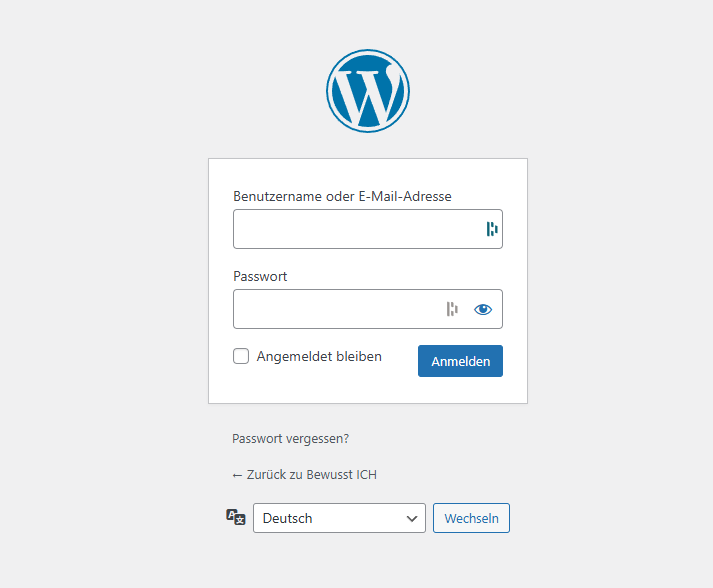
To get started, open your browser and go to your WordPress login page. Usually, it's yourdomain.com/wp-admin. Enter your username and password, then click on “Log In” to access your WordPress dashboard.


Step 2: Go to "Pages" and Select the One You Want to Edit


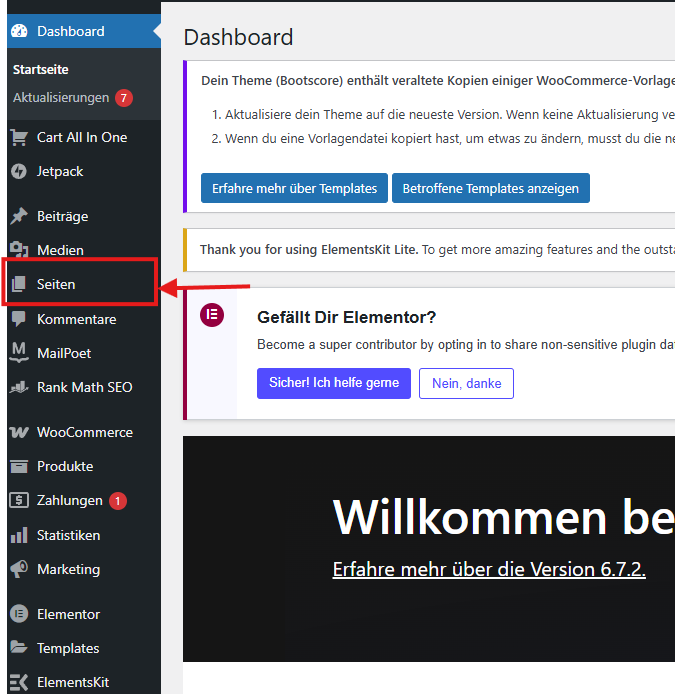
In the WordPress dashboard, navigate to the menu on the left and click on “Pages.” Here, you will see a list of all the pages on your website. Find the page you want to edit and click on its title to open it.

Step 3: Edit the Homepage with Elementor


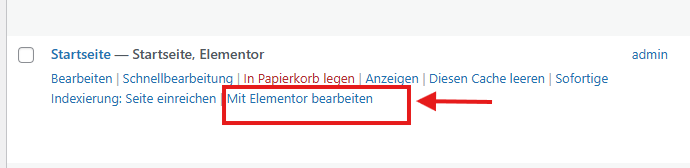
To edit your homepage, hover over the homepage title in the “Pages” section. You’ll see a few options appear underneath. Click on “Edit with Elementor” to open the page in the Elementor editor.


Step 4: Use the Elementor Dashboard to Add Elements


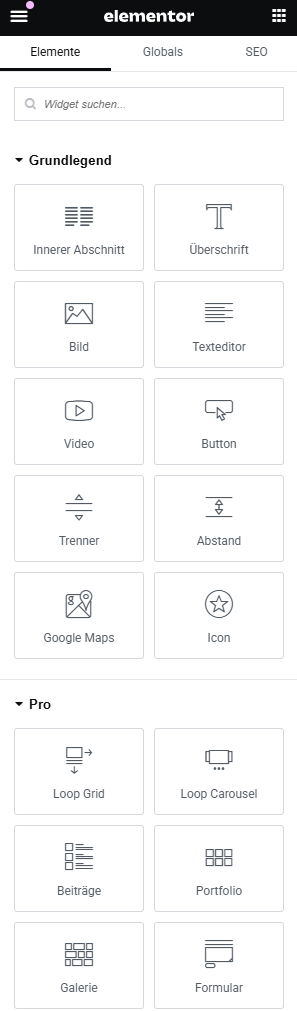
On the left side of the Elementor editor, you'll see a panel with various elements (called widgets) that you can add to your page—such as text, images, buttons, and more. Simply drag and drop any element into the page area to begin editing.

Step 5: How to Edit a Title

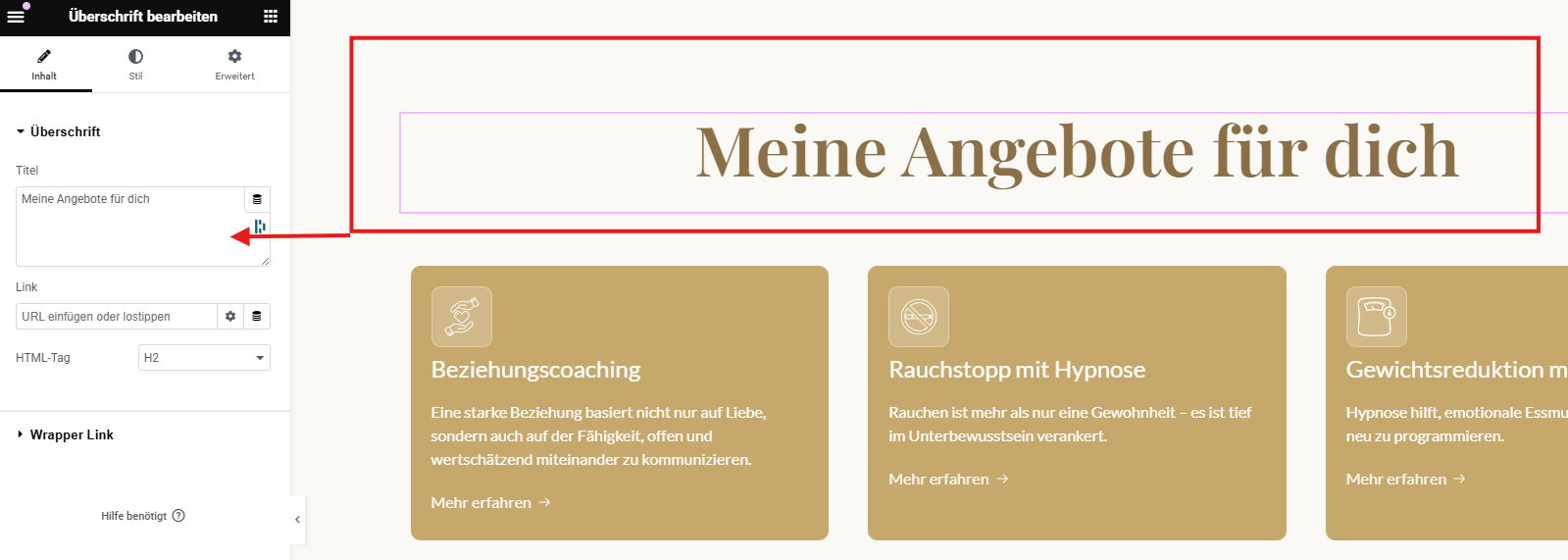
To edit a title, simply click on the heading you want to change. Once you do, the left dashboard will display the settings for that element. In the "Title" field, you can replace the existing text with your new heading.


Step 6: How to Edit the Style of the Text


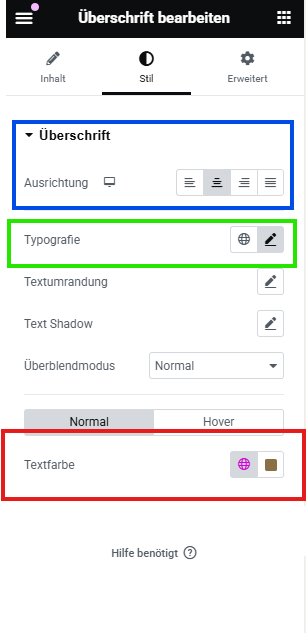
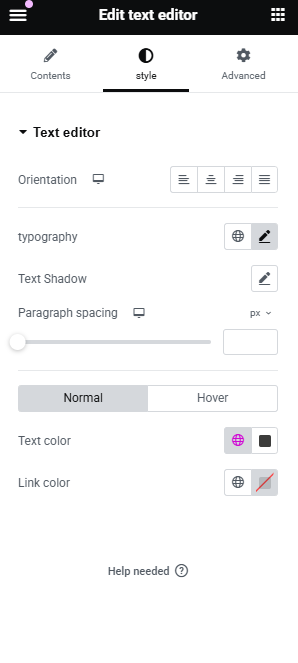
To edit the style of your text, click on the text element you want to change, then go to the “Style” tab in the left dashboard.

  • Here, you can adjust the alignment (left, center, or right).
  • You can also change the typography—such as the font, font size, and more.
  • Additionally, you can modify the text color to match your design preferences.

This gives you full control over the look and feel of your text.

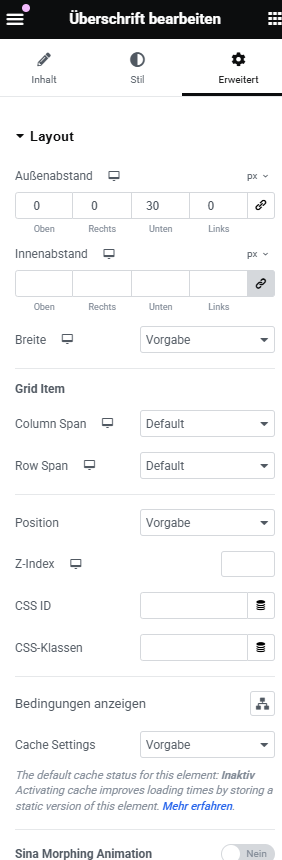
Step 7: Use the Advanced Settings for Headings in Elementor


Once you’ve selected a heading element, go to the “Advanced” tab in the left panel. This section gives you more control over spacing, positioning, and responsiveness.

Here’s what you can do:

  • Margin & Padding: Add space around or inside the heading to better control layout and spacing.
  • Z-Index: Manage the layering of elements. A higher value brings the heading in front of other elements.
  • Motion Effects: Add entrance animations like fade-in, slide, or zoom to make your headings more dynamic.
  • Responsive Controls: Set different styles or visibility for desktop, tablet, and mobile views.
  • Custom CSS (Pro): If you’re using Elementor Pro, you can add your own CSS for even more customization.

These advanced tools help you fine-tune the design for a clean and professional result.


Step 8: How to Edit Text in Elementor


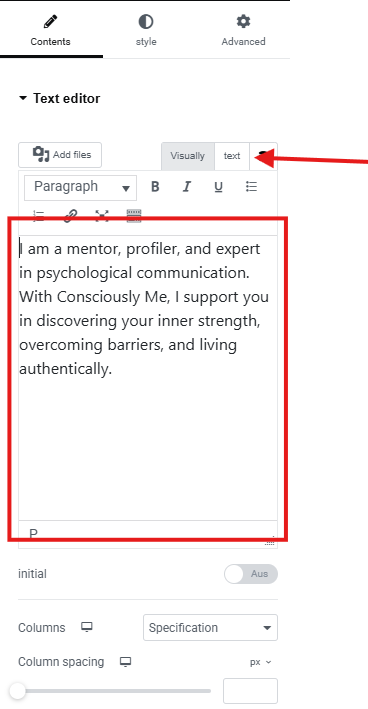
To edit a text block, simply click on the text you want to change. On the left dashboard, a text editor will appear where you can enter your new content.

It’s recommended to switch to the “Text” (HTML) tab instead of the “Visual” tab when editing. This ensures that your formatting stays clean and consistent—especially if you're pasting in content from another source. The "Text" mode helps avoid unwanted styles or spacing issues that can come with "Visual" mode.

Tip: Always double-check how the text appears on the live site to ensure everything looks smooth.


Step 9: Text Style Editing Works the Same as Heading Style


In Elementor, editing the style of a text block (like a paragraph) works exactly the same way as editing a heading. Just click on the text, go to the Style tab, and from there you can adjust typography, alignment, and color—just like you would with a heading element.

This consistency makes it easy to style all text elements across your page with the same workflow.

Step 10: How to Edit a Button in Elementor


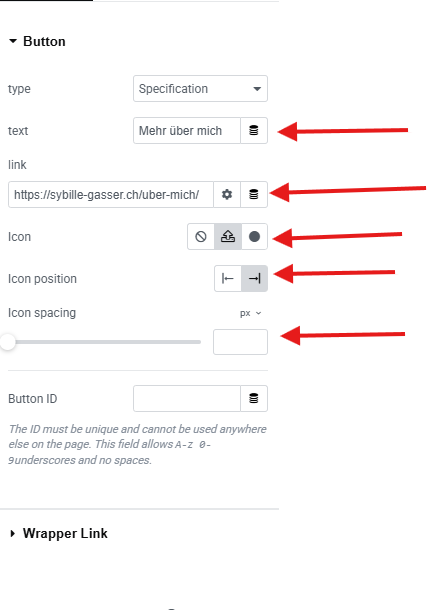
To customize a button in Elementor, click on the button element and use the options in the left panel. Here’s what you can do:

  1. Edit the Button Text – Change the label that appears on the button.
  2. Add a Link – Enter the URL where the button should lead when clicked.
  3. Choose an Icon – You can select an icon to display inside the button.
  4. Icon Position – Decide whether the icon should appear on the left or right side of the text.
  5. Icon Spacing – Adjust the space between the icon and the text for better alignment and design.
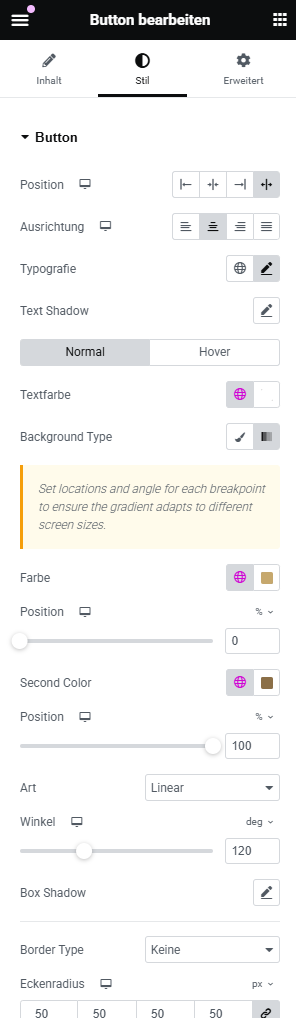
Step 11: Styling Buttons in Elementor (Based on the Style Tab)

When you click on a button and go to the Style tab in Elementor, you get full control over how the button looks. Here's a breakdown of the key styling options:

  • Position: Adjusts the button's alignment within its section (left, center, right, or justified).
  • Alignment (Ausrichtung): Controls the horizontal alignment of the button itself.
  • Typography: Customize the font, size, weight, and spacing of the button text.
  • Text Shadow: Add a shadow to the text for extra emphasis or visual depth.
  • Normal / Hover Tabs: Switch between the default and hover styles to set different appearances for each state.
  • Text Color (Textfarbe): Choose the color of the text when in normal or hover state.
  • Background Type: Select a solid or gradient background color for the button.
  • Gradient Settings: If you choose a gradient background, you can set:
    • First and Second Color
    • Gradient Direction (Winkel)
    • Gradient Style (Linear or Radial)
    • Color Positions for start and end
  • Box Shadow: Adds a shadow behind the button for a more elevated, clickable look.
  • Border Type: Choose border styles like solid, dashed, or none.
  • Border Radius (Eckenradius): Round the corners of the button by entering pixel values for each corner.

These options let you create unique, professional-looking buttons that match your site’s design perfectly.


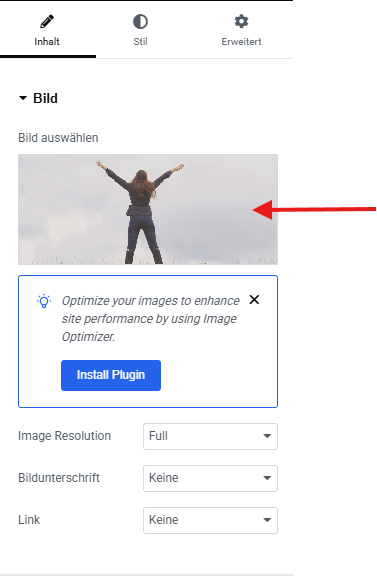
Step 12: How to Edit an Image in Elementor


To edit an image, simply click on the image element you want to change. On the left dashboard, you’ll see the image settings.

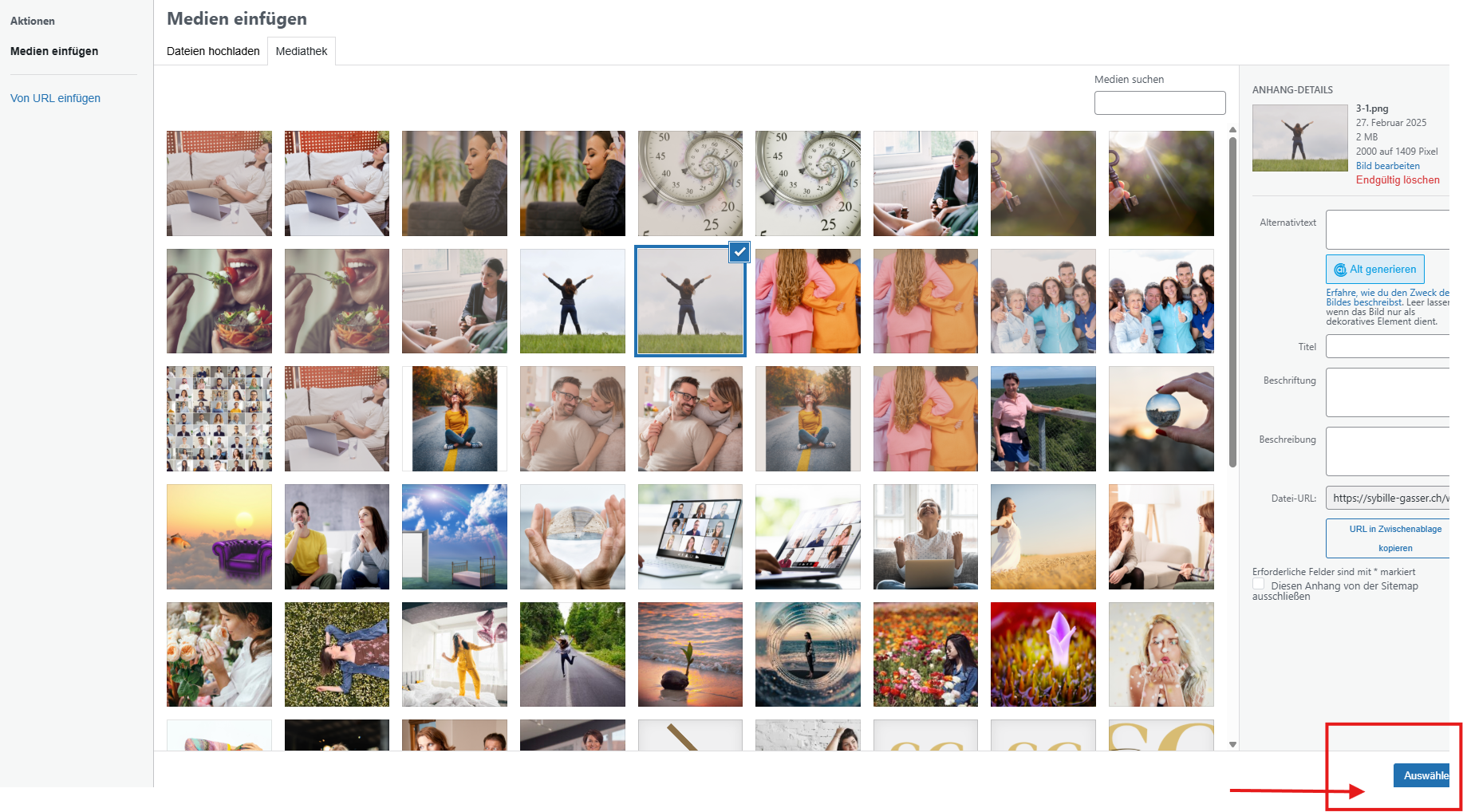
Click on the “Choose Image” button to open the media library. From there, you can either select an existing image or upload a new one. Once you’ve chosen your image, click “Insert Media”, and it will appear in place of the old one.
Step 13: How to Style Media (Images) in Elementor

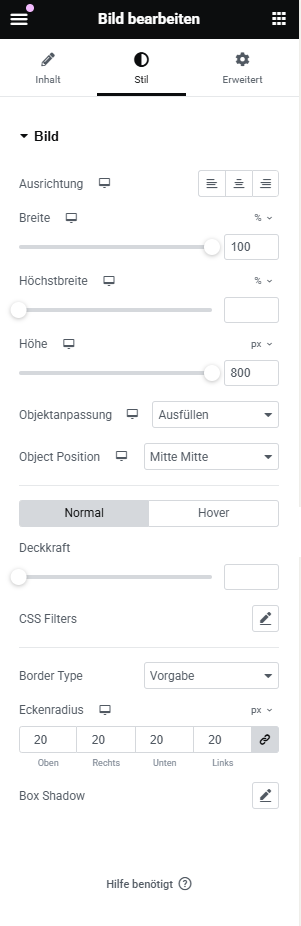
After inserting an image, go to the Style tab in the left panel to adjust its appearance. Elementor gives you several styling options to make your images look polished and professional:

  • Width: Adjust the size of the image manually using a percentage or pixel value.
  • Max Width: Set a limit to how wide the image can grow on larger screens.
  • Height (in some cases): Control the image’s height if needed.
  • Opacity: Make the image more transparent or fully visible.
  • CSS Filters: Apply effects like blur, brightness, contrast, and saturation.
  • Hover Animation: Add subtle effects when the user hovers over the image.
  • Border Type & Radius: Add a border and round the corners for a softer or more modern look.
  • Box Shadow: Create depth by adding a shadow behind the image.

These tools help enhance your site’s visual appeal and ensure that your media blends smoothly with the overall design.

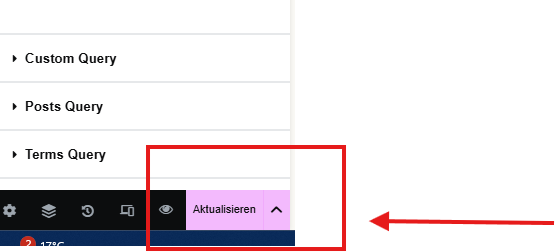
Step 14: Publish Your Changes


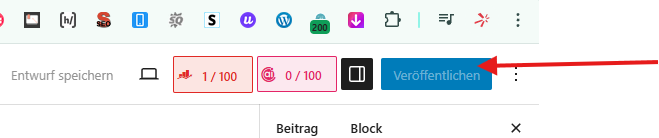
After you’ve finished making all your edits, it’s time to make them live! Simply click the “Publish” button at the bottom of the Elementor panel.

If the page was already published before, the button will say “Update” instead. Clicking it will save and apply all the changes you made to the live version of your site.

Always preview your changes before publishing to ensure everything looks as expected.

Step 15: How to Add a New Blog Post in WordPress

To create a new blog post:

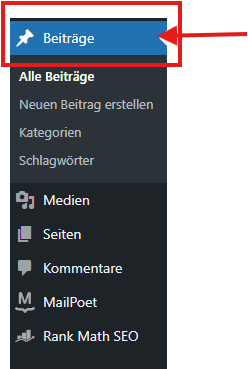
  1. Go to your WordPress dashboard.
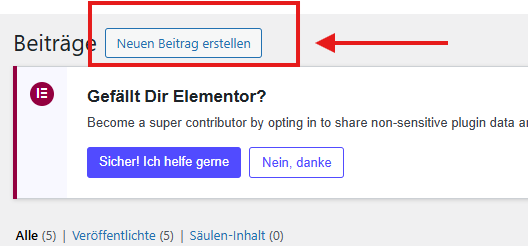
  2. In the left-hand menu, click on “Posts” and then select “Add New.”
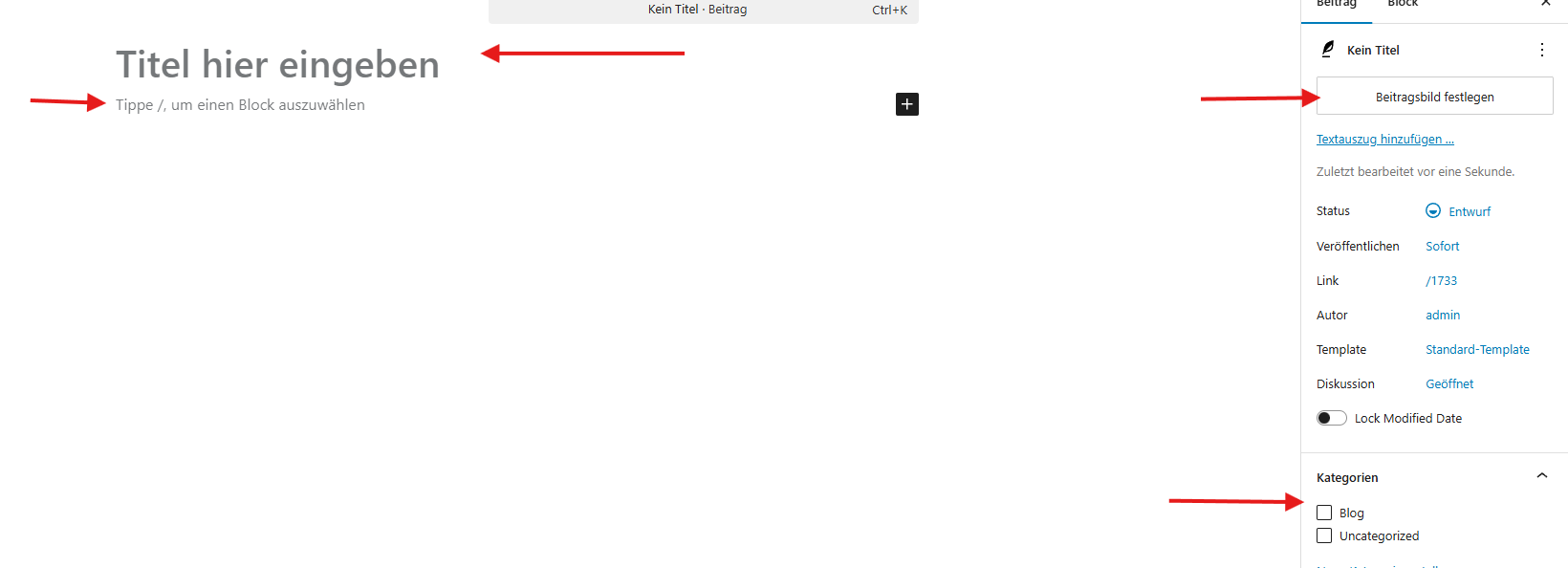
  3. Enter your post title at the top.
  4. Add your content in the editor below. You can use blocks for paragraphs, images, headings, etc.
  5. On the right-hand side, set options like categories, tags, and a featured image.
  6. When you're ready, click “Publish” to make your post live.

You can also use Elementor to design your blog post visually by clicking “Edit with Elementor” before publishing.
\


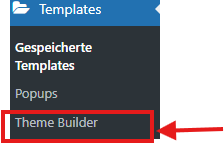
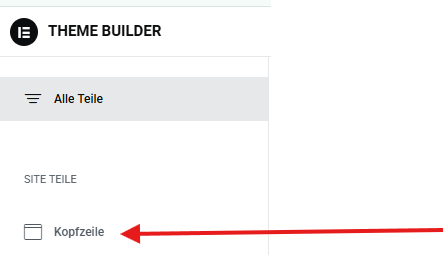
Step 16: How to Edit the Header in Elementor


To edit your website’s header:

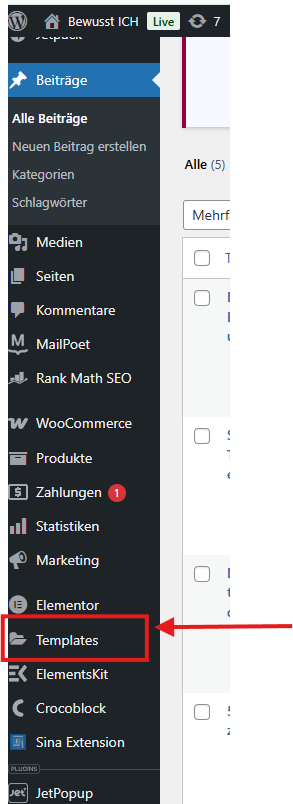
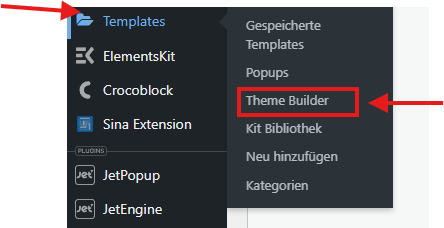
  1. In your WordPress dashboard, go to Templates in the left menu.
  2. Click on Theme Builder.
  3. In the Theme Builder, select the Header tab.
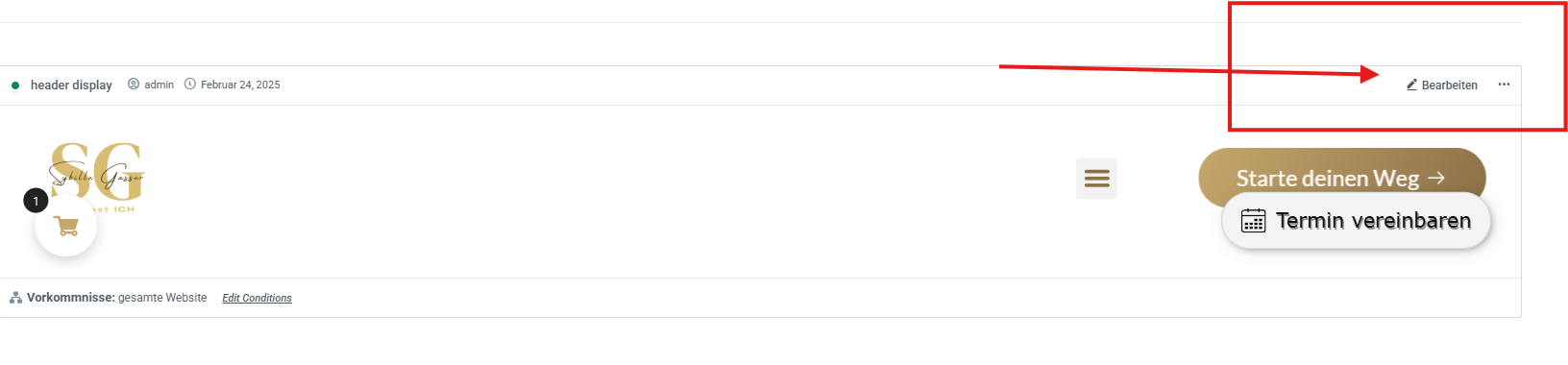
  4. You'll see your existing header templates—click “Edit with Elementor” on the one you want to change.

From there, you can customize your header using Elementor just like any other section—adding logos, menus, buttons, and styling it however you like.
Step 17: How to Edit the Logo in Elementor


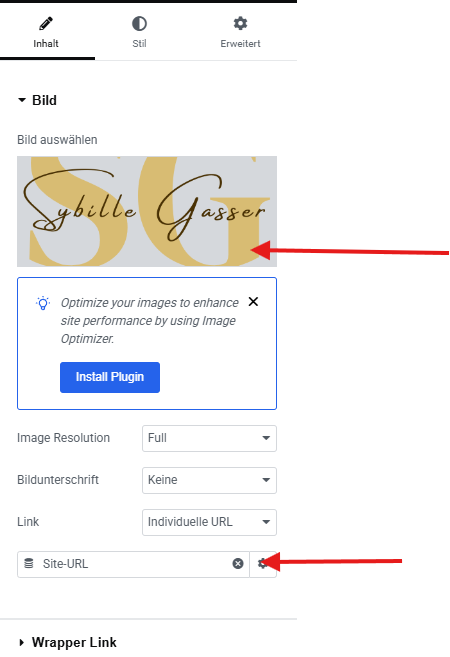
Editing the logo works just like editing any other image in Elementor:

  1. Click on the logo image in your header.
  2. On the left panel, click “Choose Image” to replace or upload a new logo.
  3. You can also add a link to the logo — simply enter your homepage URL (e.g., / or your full domain) in the Link field.

This ensures that when users click on the logo, they’re taken back to the homepage — a common and user-friendly navigation feature.

Step 18: How to Edit a Menu in Elementor


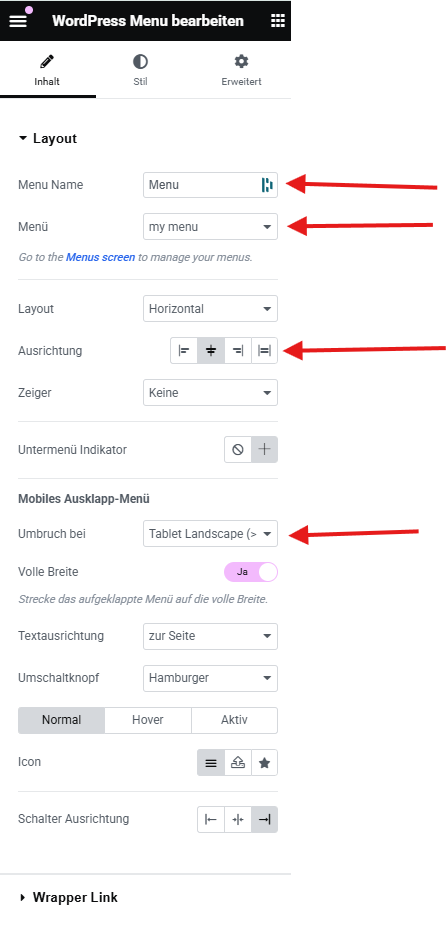
To customize your navigation menu in Elementor:

  1. Click on the menu element in your header section.
  2. On the left panel, you can:
    • Set the menu name (optional label for reference).
    • Choose an existing menu from the dropdown — this is a menu you've previously created in WordPress (with the pages you want).
    • If you haven’t created a menu yet, scroll down to see the next step explaining how to do that.
  3. Choose the menu layout (horizontal, vertical, or dropdown).
  4. Set the breakpoint — this defines when the menu switches to a mobile (hamburger) version for smaller screens.

This way, your navigation menu looks good and works well on all devices.

Step 19: Styling the Navigation Menu in Elementor


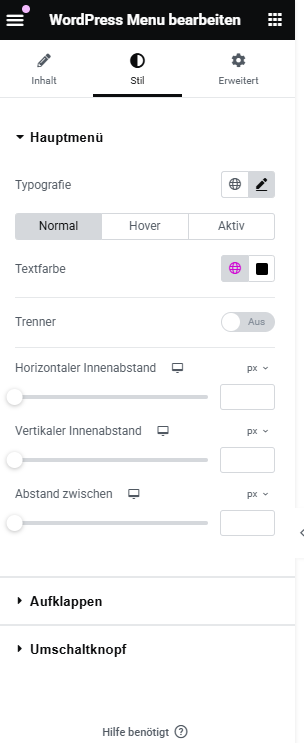
To style your WordPress menu, click on the menu widget and switch to the Style tab. From here, you can control the visual appearance of your menu items in different states: Normal, Hover, and Active.

Here are the key styling options:

  • Typography: Customize the font, size, weight, letter spacing, and more for your menu text.
  • Text Color: Set the color of the text in all three states: Normal, Hover, and Active.
  • Separator (Trenner): Option to enable/disable separators between menu items.
  • Horizontal Padding: Adds spacing on the left and right inside each menu item.
  • Vertical Padding: Adds spacing above and below each menu item.
  • Item Spacing (Abstand zwischen): Sets the space between each menu item.

You can also expand sections like Dropdown (Aufklappen) and Toggle Button (Umschaltknopf) to customize the mobile menu and dropdown styles.


Step 20: How to Create or Edit a Menu in WordPress 


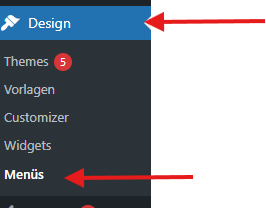
To manage your website’s menus, go to your WordPress dashboard and navigate to Appearance > Menus. Here’s what you can do:

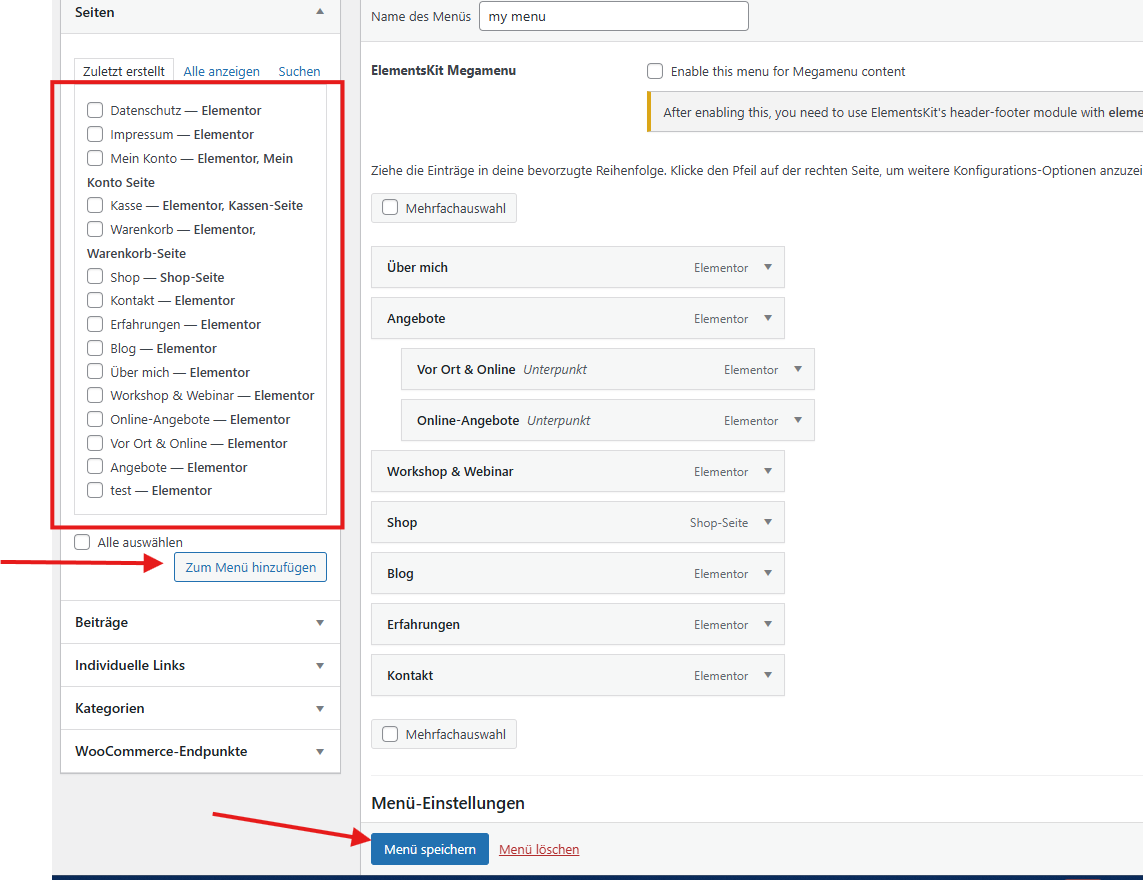
  • Create a new menu by clicking on “Create a new menu.”
  • Add pages, posts, or custom links to the menu using the options on the left.
  • Drag and drop menu items to reorder them or create dropdown submenus.
  • Assign the menu to a display location (like Header, Footer, or Mobile).
  • Once everything is set up, click “Save Menu” to apply the changes.

This menu will now be available for selection inside Elementor when editing the navigation widget.

Step 21: How to Edit the Footer in Elementor

To edit your website’s footer with Elementor:

  1. Go to your WordPress dashboard.
  2. Navigate to Templates > Theme Builder.
  3. Click on the Footer tab to view your existing footer templates.
  4. Find the footer you want to edit and click “Edit with Elementor.”
  5. Once in the editor, you can modify all elements just like any other section — add columns, text, images, menus, social icons, and more.
  6. When you're done, click “Update” to save your changes.

Tip: You can also set display conditions to control where the footer appears (e.g. entire site, specific pages, etc.).


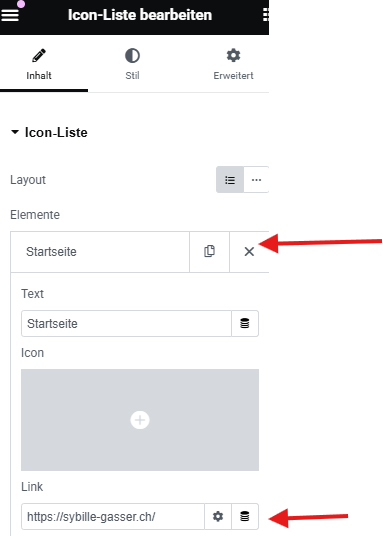
Step 22: How to Edit and Add Items to an Icon List Menu in Elementor


If your menu is built using the Icon List widget (commonly used in footers or sidebars), you can easily edit or expand it:

  1. Click on the Icon List element in the Elementor editor.
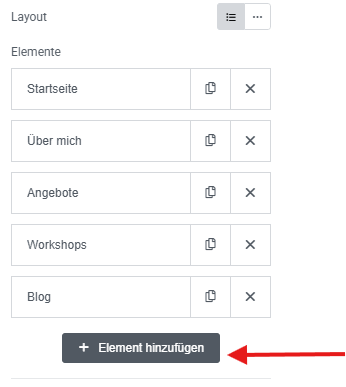
  2. On the left panel, you'll see a list of all current menu items.
  3. For each item, you can:
    • Change the text (this is the name shown).
    • Edit the link (the URL where it redirects).
    • Select or change the icon next to the text.
  4. To add a new item, scroll to the bottom of the list and click the “Add Item” button. A new list entry will appear that you can customize like the others.

This widget is great for quick, simple menus with full visual control.


Step 23: How to Add a New Product in WooCommerce

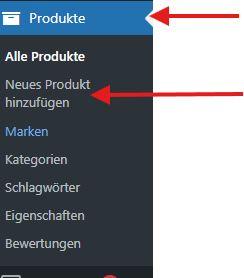
If you have a shop set up with WooCommerce, you can add new products directly from your WordPress dashboard:

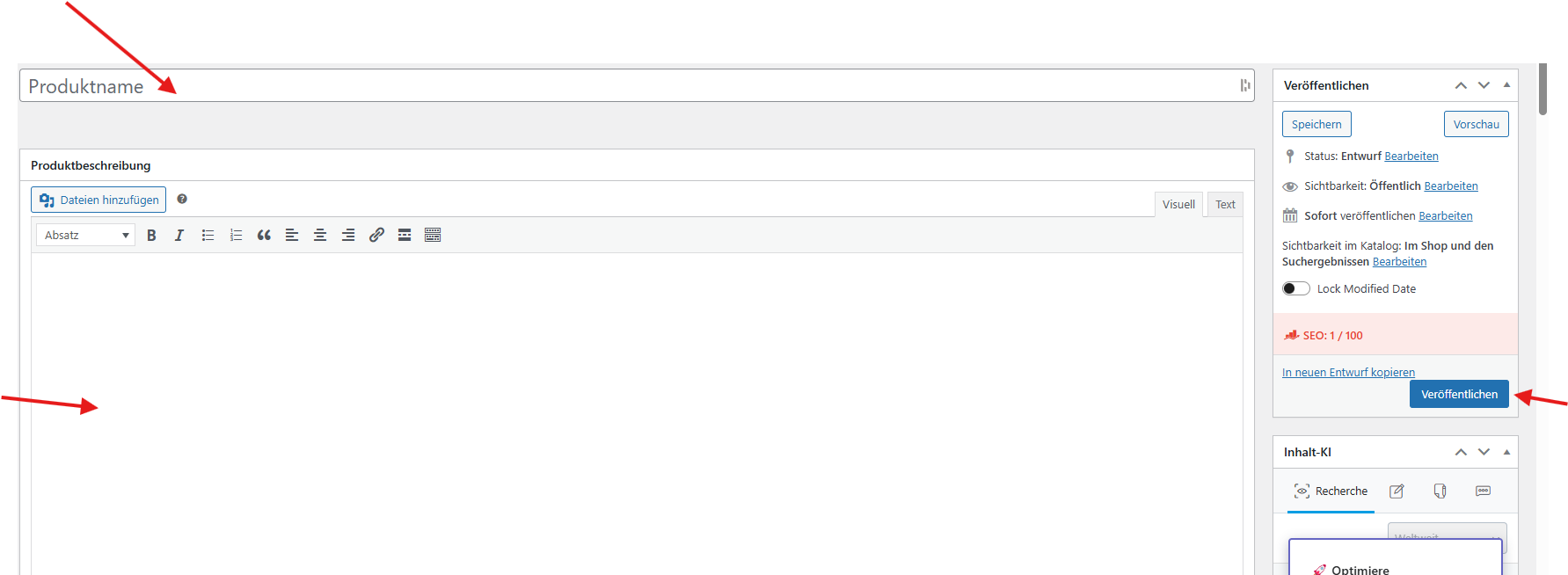
  1. Go to Products > Add New in the WordPress admin menu.
  2. Enter the product name at the top.
  3. In the main content area, add a product description (this appears on the product detail page).
  4. Scroll down to the Product Data section:
    • Choose Simple product (or other types like Variable or Grouped).
    • Enter the price.
    • Add inventory details, shipping info, and linked products if needed.
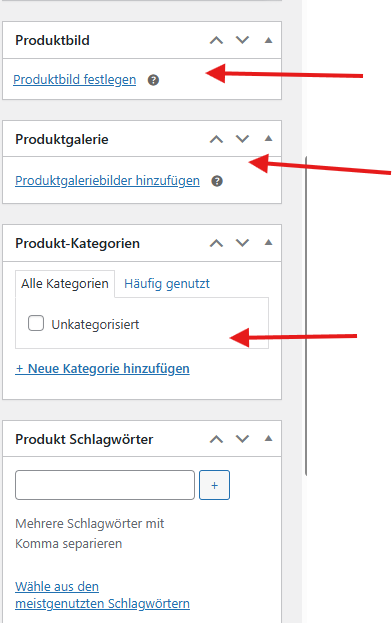
  5. On the right-hand side:
    • Add a product image.
    • Add product gallery images (optional).
    • Assign the product to a category.
  6. When you're ready, click “Publish” to make the product live in your shop.


Step 24: Choosing the Product Type in WooCommerce

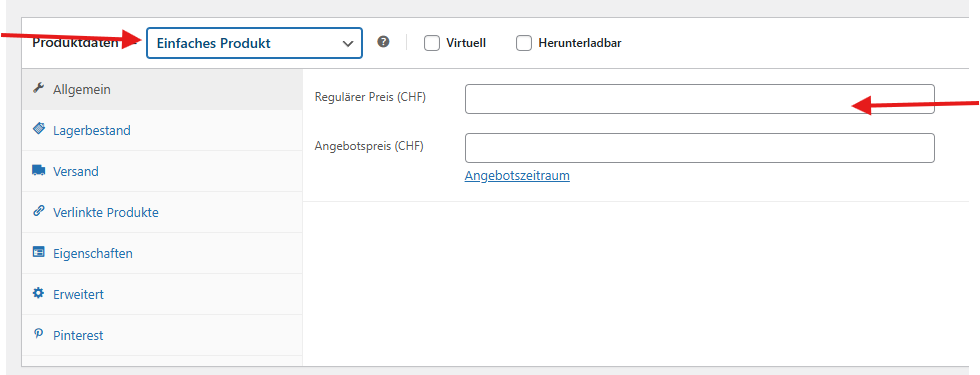
When adding a new product in WooCommerce, you can choose the type of product you're creating. This is done in the “Product Data” section, just below the main description box.

Here are the most common product types:

  • Simple Product: A basic product with no variations. Example: a book or a candle.
  • Variable Product: A product with different options like size, color, or material. Example: a t-shirt available in multiple sizes.
  • Grouped Product: A collection of related products that can be purchased individually.
  • External/Affiliate Product: A product that links to another website for purchase.

To choose the type:

  1. Scroll down to the Product Data box.
  2. Open the dropdown at the top left.
  3. Select the product type that matches what you're selling.

Choosing the correct type ensures the right options appear for your customers on the product page.

Final Step: You’re Ready to Build and Launch!

Congratulations — you've now learned how to:

  • Edit pages, headers, footers, and menus with Elementor
  • Add and style images, text, and buttons
  • Create and manage blog posts
  • Build and customize your online shop with WooCommerce
  • Set up product types, categories, and styling

With these steps, you now have the tools to confidently build, manage, and grow your WordPress website using Elementor.

Take your time to explore more features, test your design, and keep improving. The best websites are never done — they evolve!

Now go ahead — hit that “Publish” button and show your site to the world. 🚀

in Customer knowledgebase
Accedi per lasciare un commento

Post correlati


Vedi tutto
Your Dynamic Snippet will be displayed here... This message is displayed because you did not provide enough options to retrieve its content.

We use cookies to provide you a better user experience on this website.  Cookie Policy

Only essentials I agree